 8f34c2760d
project:cfg:BoardConfig_IPC: Added fastboot BoardConfig file and firmware post-scripts, distinguishing between the BoardConfigs for Luckfox Pico Pro and Luckfox Pico Max. project:app: Added fastboot_client and rk_smart_door for quick boot applications; updated rkipc app to adapt to the latest media library. media:samples: Added more usage examples. media:rockit: Fixed bugs; removed support for retrieving data frames from VPSS. media:isp: Updated rkaiq library and related tools to support connection to RKISP_Tuner. sysdrv:Makefile: Added support for compiling drv_ko on Luckfox Pico Ultra W using Ubuntu; added support for custom root filesystem. sysdrv:tools:board: Updated Buildroot optional mirror sources, updated some software versions, and stored device tree files and configuration files that undergo multiple modifications for U-Boot and kernel separately. sysdrv:source:mcu: Used RISC-V MCU SDK with RT-Thread system, mainly for initializing camera AE during quick boot. sysdrv:source:uboot: Added support for fastboot; added high baud rate DDR bin for serial firmware upgrades. sysdrv:source:kernel: Upgraded to version 5.10.160; increased NPU frequency for RV1106G3; added support for fastboot. Signed-off-by: luckfox-eng29 <eng29@luckfox.com> |
||
|---|---|---|
| .. | ||
| iperf.c | ||
| README.md | ||
| SConscript | ||
iperf:网络带宽测试工具
1、介绍
iperf 是一个网络性能测试工具。iperf 可以测试最大 TCP 和 UDP 带宽性能,具有多种参数和 UDP 特性,可以根据需要调整,可以报告带宽、延迟抖动和数据包丢失。
2、使用
iperf 使用的是主从式架构,即一端是服务器,另一端是客户端,我们提供的 iperf 组件包实现了 TCP 服务器模式和客户端模式,暂不支持 UDP 测试。下面将具体讲解 2 种模式的使用方法。
2.1 iperf 服务器模式
2.1.1 获取 IP 地址
需要在 RT-Thread 上使用 Finsh/MSH 命令来获取 IP 地址,大致效果如下:
msh />ifconfig
network interface: e0 (Default)
MTU: 1500
MAC: 00 04 9f 05 44 e5
FLAGS: UP LINK_UP ETHARP
ip address: 192.168.12.71
gw address: 192.168.10.1
net mask  : 255.255.0.0
dns server #0: 192.168.10.1
dns server #1: 223.5.5.5
- 记下获得的 IP 地址 192.168.12.71(按实际情况记录)
2.1.2 启动 iperf 服务器
需要在 RT-Thread 上使用 Finsh/MSH 命令来启动 iperf 服务器,大致效果如下:
tcp 模式
msh />iperf -s -p 5001
udp 模式
msh />iperf -u -s -p 5001
- -s 表示作为服务器启动
- -p 表示监听 5001 端口
2.1.3 安装 JPerf 测试软件
安装文件位于 /tools/jperf.rar ,这个是绿色软件,安装实际上是解压的过程,解压到新文件夹即可。
2.1.4 进行 jperf 测试
打开 jperf.bat软件,按如下操作进行配置:
- 选择
Client模式 - 输入刚刚获得的 IP 地址 192.168.12.71(按实际地址填写)
- 修改端口号为 5001
- 点击
run Lperf!开始测试 - 等待测试结束。测试时,测试数据会在 shell 界面和 JPerf 软件上显示。
tcp 模式软件设置

udp 模式软件设置

2.2 iperf 客户端模式
2.2.1 获取 PC 的 IP 地址
在 PC 的命令提示符窗口上使用 ipconfig 命令获取 PC 的 IP 地址,记下获得的 PC IP 地址为 192.168.12.45(按实际情况记录)。
2.2.2 安装 JPerf 测试软件
安装文件位于 /tools/jperf.rar ,这个是绿色软件,安装实际上是解压的过程,解压到新文件夹即可。
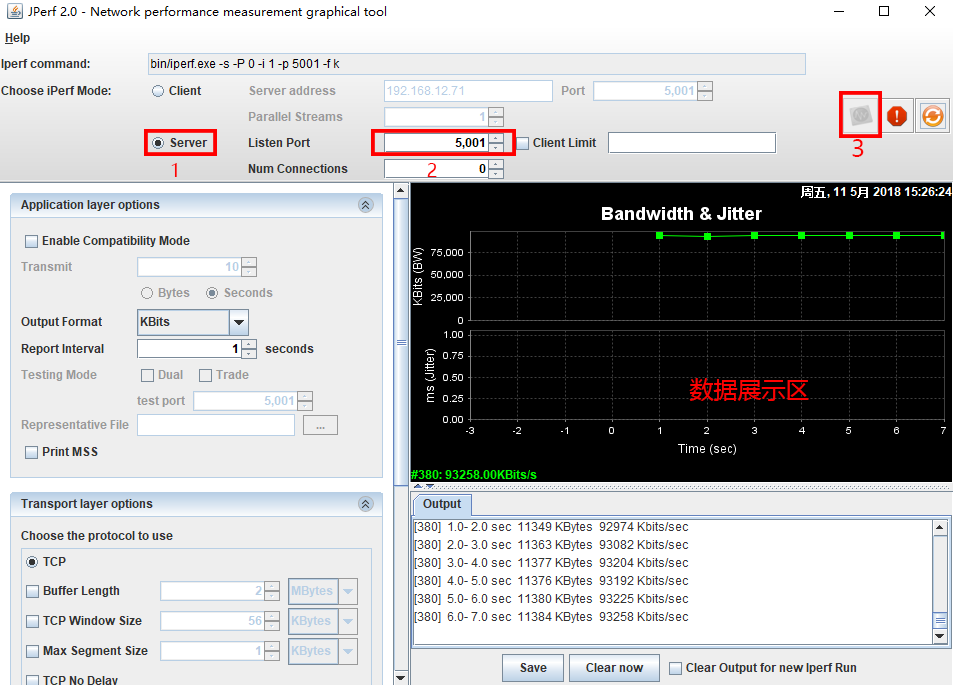
2.2.3 开启 jperf 服务器
打开 jperf.bat软件,按如下操作进行配置:
- 选择
Server模式 - 修改端口号为 5001
- 点击
run Lperf!开启服务器
2.2.4 启动 iperf 客户端
需要在 RT-Thread 上使用 Finsh/MSH 命令来启动 iperf 客户端,大致效果如下:
tcp 模式
msh />iperf -c 192.168.12.45 -p 5001
udp 模式
msh />iperf -u -c 192.168.12.45 -p 5001
- -c 表示作为客户端启动,后面需要加运行服务器端的pc的 IP 地址
- -p 表示连接 5001 端口
- 等待测试结束。测试时,测试数据会在 shell 界面和 JPerf 软件上显示。
tcp 模式软件设置
udp 模式软件设置
